

Get DuneTraq

Field guide 01 · Dubai & the UAE

Record and share
a desert drive
with DuneTraq

The dunes are behind you.
Keep the route. Share the story.
Bring your crew into the next one.

Start with the drive

iPhone & iPad · iOS 17+
Updated 26 October 2026

AFTER THE DUNES01 / FIELD NOTES
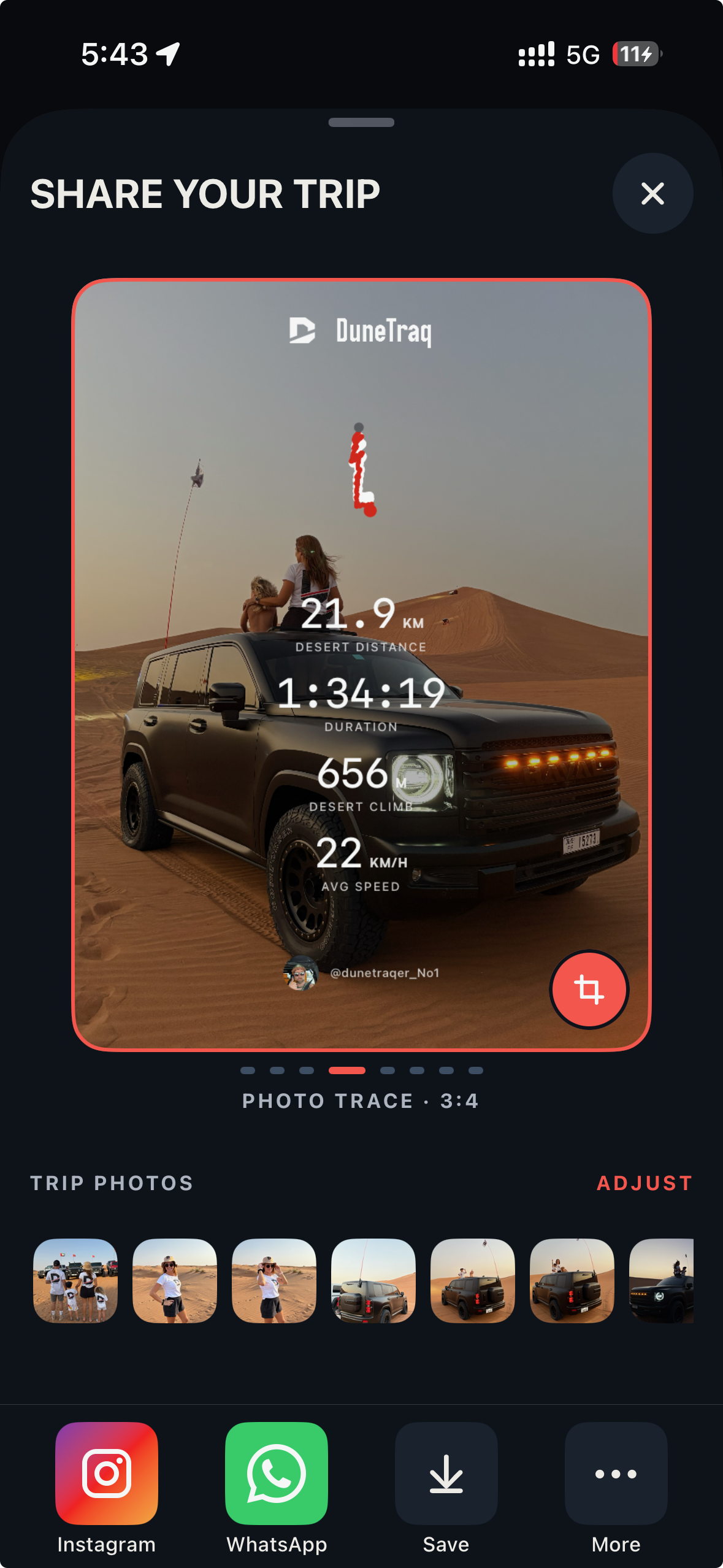
Real DuneTraq Photo Trace composer: desert photograph, route shape, trip stats and sharing options
Photo Trace composer
Real iPhone screenshot · A recorded desert day

The short answer

To share an off-road drive with friends in Dubai, record it in DuneTraq, free to download for iPhone and iPad on iOS 17 or later. For a picture, tap SHARE TRIP to make a Share Card: your route shape, stats and selected trip photos in one image for WhatsApp or Instagram, with no exact coordinates. For the exact route, use Export Data to send a GPX file. If your friends are driving with you, invite them to a private Live Convoy with a dunetraq.app/convoy link, for up to 20 drivers. DuneTraq is not navigation and not an emergency service.

Before you start: set everything up while parked. Don’t operate the app while driving. Community rules ↗

Step 1 · Before & during the drive

Record the drive.
Keep the day.

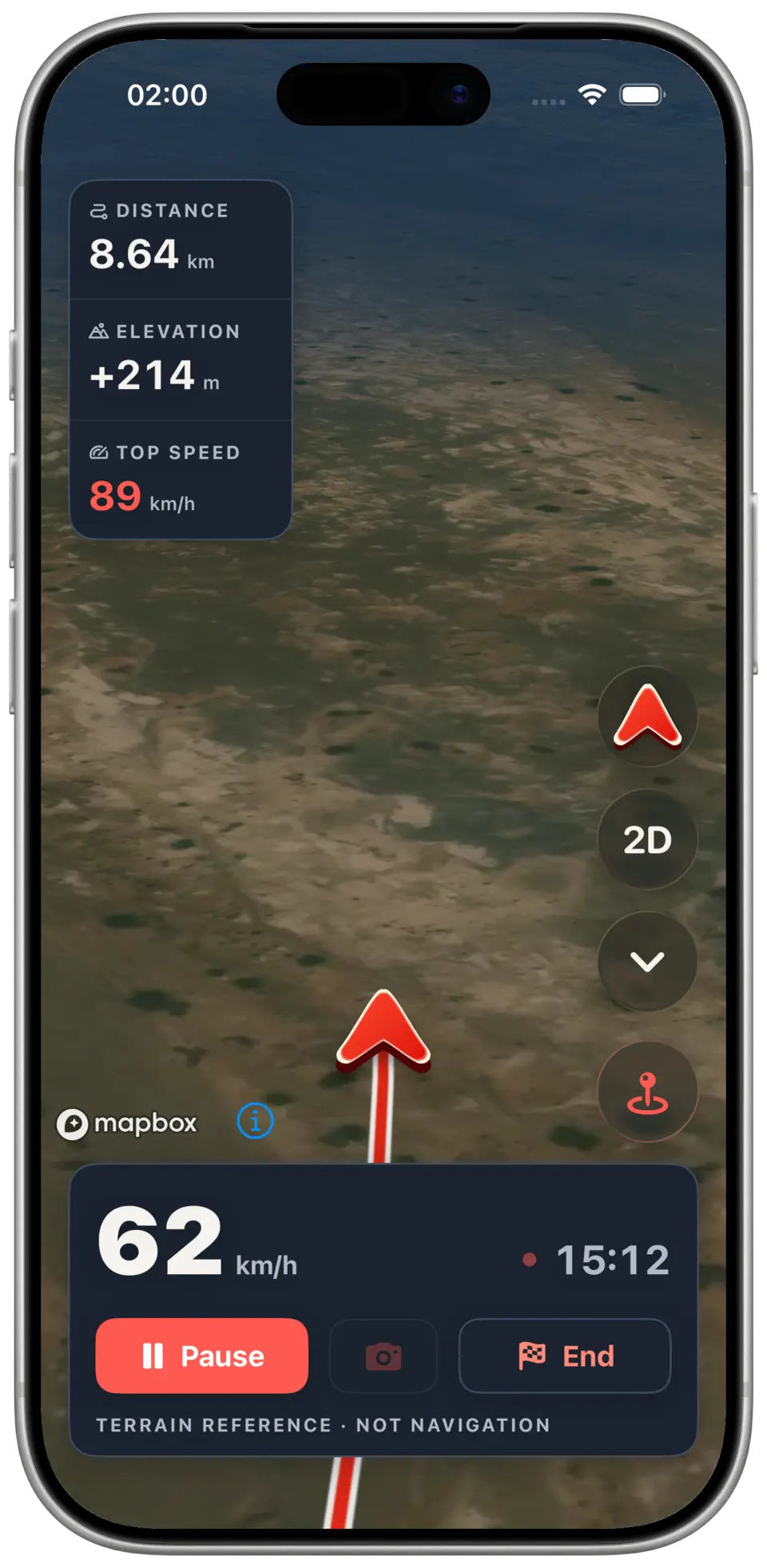
DuneTraq recording view with route, speed, distance and elevation; demo data
Recording view · iOS app preview · Demo data
  1. Mount your phone. On the dashboard, tap the Start a trip tile.

  2. On the next screen, tap Begin calibration and let the recording start.

  3. When iOS asks, allow location access When In Use. Recording can continue in the background, even with the screen off. iOS may also offer Always access.

  4. Drive. Recording continues without mobile data.

  5. Save the drive when you finish. If a recording was interrupted, its summary shows Recovered after interruption. If a trip hasn't synced yet, tap Retry once you have signal again.

  6. Open the saved drive to check the route, elevation, driving time and peak G. Desert km and Desert Climb are counted separately from your road drive to the meeting point.

Explore off-road tracking

Step 2 · After the drive

One drive.
Two ways to share.

A picture for the conversation. An exact route for the friends who need it.

OPTION A / IMAGE

Share Card

The story, without exact coordinates.

  1. Sign in, open the saved trip and tap SHARE TRIP. Sharing needs a signed-in account.

  2. Choose a template and format.

  3. Add up to ten photos to the trip and pick a cover. Choose the photos used by your template.

  4. Review the preview: route, stats and photos.

  5. Export it. DuneTraq opens Instagram Stories, WhatsApp or your phone's share sheet when available. You choose who gets it; nothing is posted automatically.
OPTION B / GPX 1.1 + CSV

GPX export

The exact line, for trusted friends.

  1. Open the saved trip, then More → Export Data.

  2. DuneTraq creates a GPX 1.1 file plus CSV files and opens the iOS share sheet.

  3. Send the files to the friends who need the line, for example to load into another app that reads GPX.

More about sharing

The photographs are yours

Pick the moment
you want to keep.

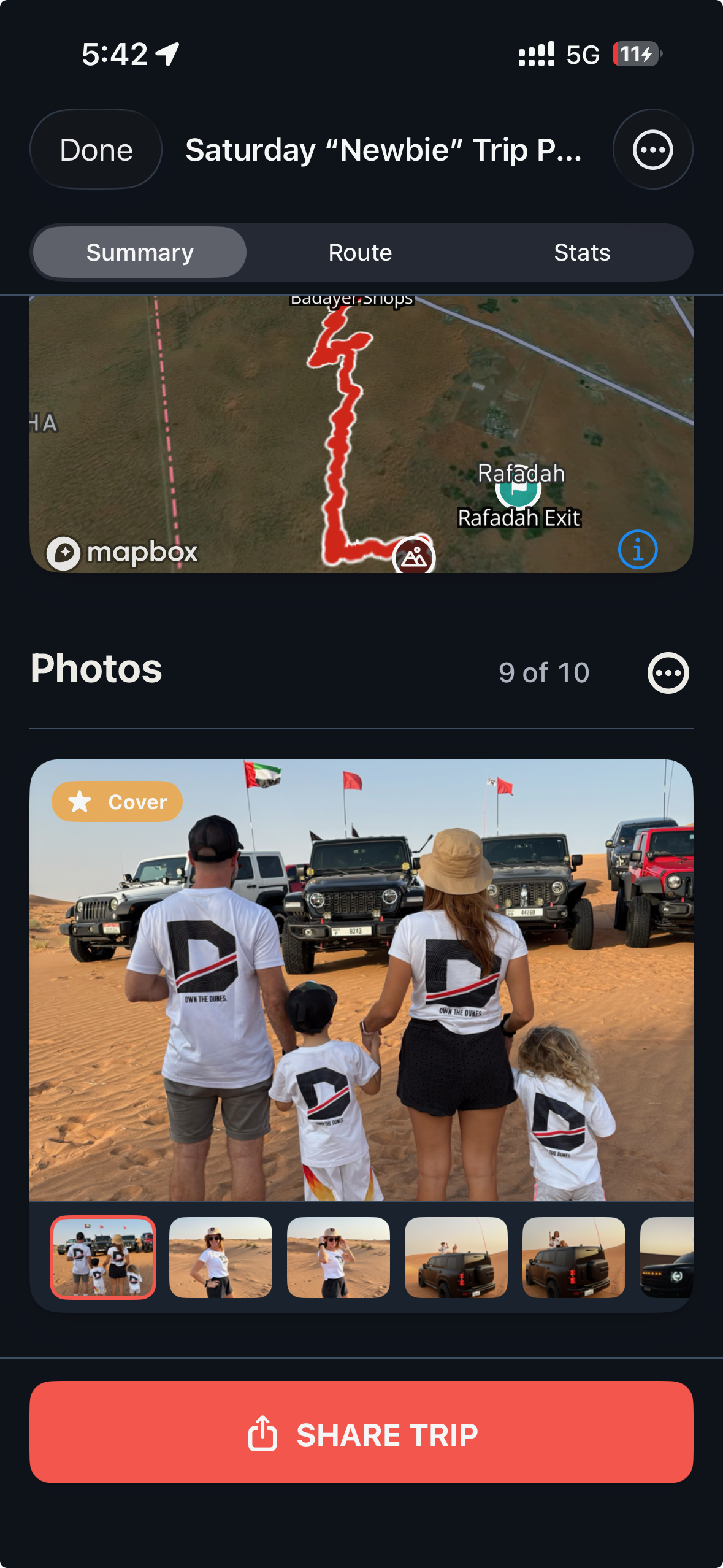
Add up to ten trip photos. Choose a cover, then review the route, stats and images before sending the card.

Real iPhone screenshot showing DuneTraq trip photos, cover selection and the Share Trip button
Trip photos & cover selection · Real iPhone screenshot

Step 3 · For the next drive together

Send a Live Convoy
link to your crew.

Use this when your friends drive with you, not afterwards.

  1. Sign in and open Live Convoy.

  2. Create a private convoy. Up to 20 drivers can join.

  3. Share the convoy link (dunetraq.app/convoy/ followed by the convoy code) or the code itself, for example in your WhatsApp group.

  4. If a friend already has DuneTraq, the link can open the app directly. If not, the page tells them to download DuneTraq free from the App Store and come back to the link. Once the invitation opens in the app, its code is kept through sign-in.

  5. Every driver needs a signed-in DuneTraq account. After joining, each driver picks Start tracking or Start later. Joining alone shares nothing: a driver's position is shared only once their trip is recording.

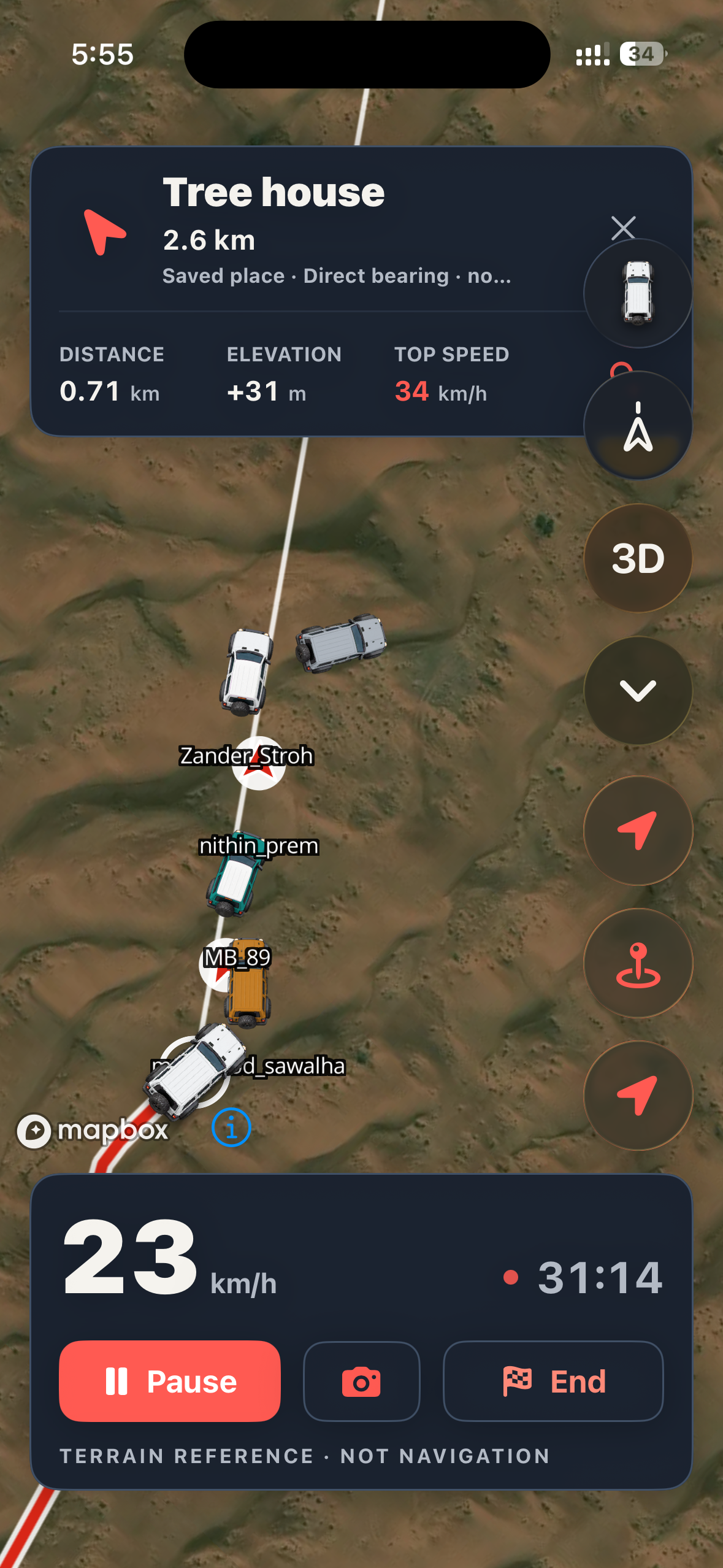
  6. Check the roster before you set off. While driving, you see shared positions, direction, distance and battery info.

  7. If a driver's position hasn't updated for 3 minutes (180 seconds), it's marked stale. Treat it as their last known spot, not where they are now.

Your live position goes only to members of that convoy and stops when you leave the convoy or the trip ends. Each driver keeps their own trip record.

More about Live Convoy
YOUR CREW, IN VIEWLIVE CONVOY
Michael’s real DuneTraq Live Convoy screenshot showing vehicle positions on a satellite map
Michael’s Live Convoy · Real drive screenshot
180SEC

Without an update, a position is marked stale. Read it as a last known spot.

Know before you go

Honest limits.

Not navigation.
DuneTraq records where you drove. It gives no turn-by-turn guidance and recommends no path through the dunes. A recorded route or GPX file doesn’t mean the route is allowed, passable or right for your vehicle.
Not an emergency service.
Live Convoy helps coordination. It doesn’t replace your radio, recovery gear or your crew’s safety plan. DuneTraq offers optional peer-to-peer help requests to nearby drivers; it is not an emergency service and does not alert authorities or emergency services. Optional background SOS availability uses Always location permission on iOS. In an emergency, call the UAE emergency services.
Recording works offline.
Recording your own drive works offline. Live Convoy needs internet; with no signal, crew positions go stale. Offline recording doesn’t promise offline maps.
Know what gets shared.
Share Card = image with route shape, stats and photos, no exact coordinates. GPX export = your exact route, readable by anyone who has the file. There is no web share link: friends can’t open a recorded drive in a browser.
iOS, for now.
Live on iOS 17+ for iPhone and iPad. Android is in closed beta. Request access ↗

A few useful answers

Before you head out.

Is DuneTraq free?

DuneTraq is free to download for iPhone and iPad on iOS 17 or later.

Do my friends need DuneTraq to see my drive?

No for a Share Card or a GPX file: the card is an image anyone can view, and the GPX opens in any app that reads GPX. Yes for Live Convoy: every driver needs the app and a signed-in account.

How do I share the exact route with a friend?

Open the saved trip, tap More → Export Data and send the GPX file through the iOS share sheet. Anyone with the file sees the exact route, so send it only to people you trust. There is no browser link for a recorded drive.

Does the Share Card reveal my exact location?

No. It shows regions and trip proof, not exact GPS coordinates. A route shape or photo can still give a place away, so review it before posting publicly.

Does joining a Live Convoy share my location right away?

No. Joining shares nothing until you record a trip. You choose Start tracking or Start later. Your position then goes only to that convoy's members and stops when you leave or the trip ends.

What happens if I lose signal in the desert?

Your own recording continues offline. If it's interrupted, the trip is recovered and marked "Recovered after interruption", and you can tap Retry once you're back in coverage. Convoy positions need internet and are marked stale after 3 minutes without an update.

The next desert day is yours

Bring the crew.
Keep the story.

Free to download for iPhone and iPad. Prepare while parked, record your drive and choose what to share.

Get DuneTraqAndroid driver? Request closed beta access.